WiTime CRM

CRM for a company with several business lines

Every business line has its own pipeline and its own stages. Invoices and acts are printed on your letterhead, and payments are visible in the client card. We have been running our own sales in WiTime since September 2026.

You cannot sign up on your own yet, and there is no pricing on the site either. We will first show you the system and then discuss terms.

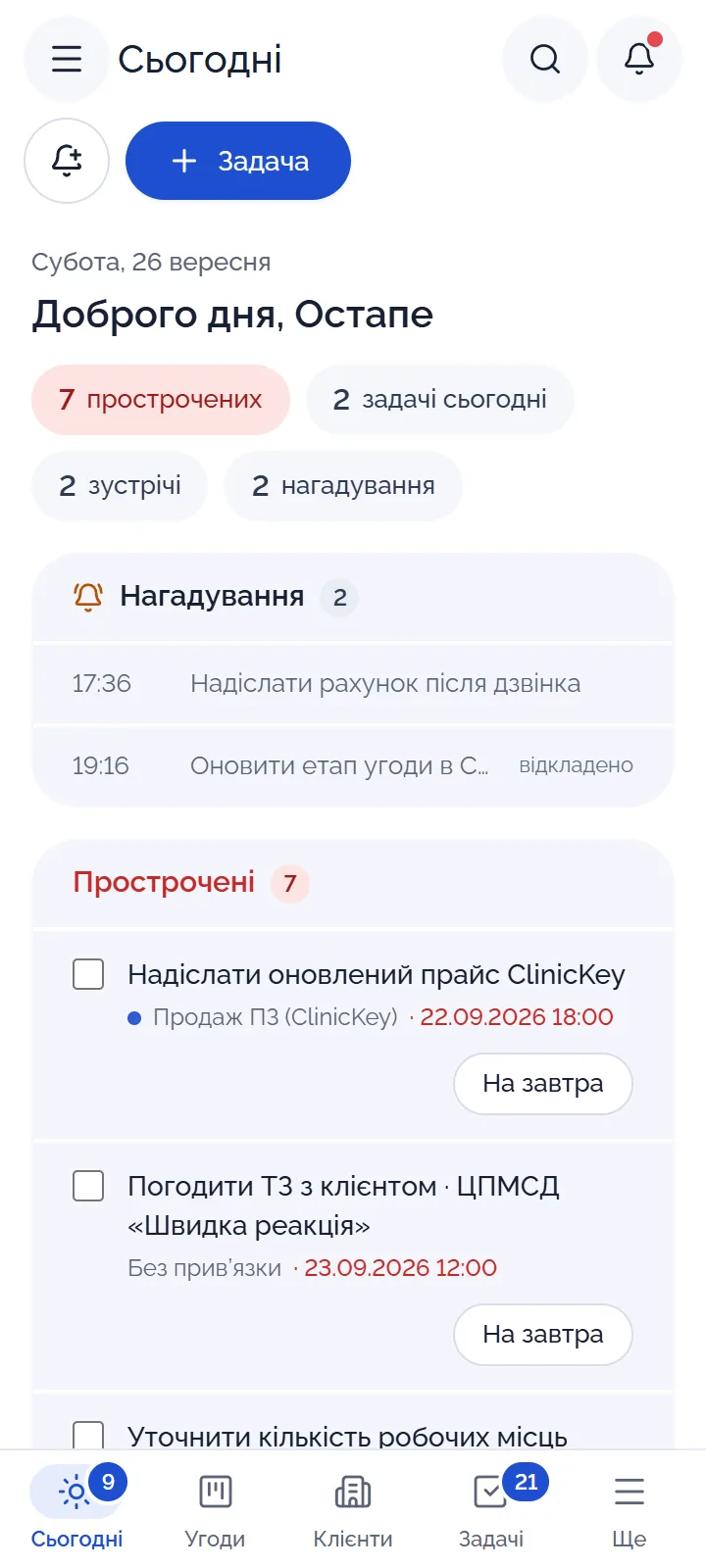
WiTime on a computer: Kanban board of deals for the “Software sales (ClinicKey)” business line with totals per stage WiTime on a phone: the “Today” screen with reminders, overdue tasks and the day's to-dos
Deal pipeline on a computer and the “Today” screen on a phone. The data in the screenshots is fictional; the screenshots show the Ukrainian interface.

Process

How a deal moves with us: from request to act

When there are several business lines, deals usually end up scattered across spreadsheets and messengers, and an invoice is made by copying the previous file, so numbering goes wrong. Who owes how much only becomes clear at the end of the month.

  1. Request

    A request from a website form appears in WiTime as a lead right away. Your website's form has to be connected once. Our site already works this way: a demo request lands in our CRM.

  2. Client and deal

    You click “Convert”, and the request turns into a counterparty, a contact and a deal in the right business line. If the company is already in the database, the system warns you. For a tender, the deal card has a separate Prozorro block.

  3. Invoice

    The invoice is printed on your letterhead. Each legal entity has its own numbering, with no gaps. The system fills in the amount in words and the VAT line or “No VAT” itself.

  4. Payment

    You upload a bank statement, and the system finds which invoices are paid by the number in the payment description. A payment can be partial, or one payment can cover several invoices. If the due date has passed, the invoice moves to “Overdue” on its own.

  5. Act

    The act (a service completion certificate) is produced on the same letterhead, as DOCX or PDF, and goes to the client by email straight from the system.

Counterparty card in WiTime: a timeline of tasks and emails for the client
Tasks, emails and deals are then visible in the client card timeline.

Product

How it looks

A separate pipeline for each business line

Business line tabs run along the top, each with its own stages. You drag a deal from column to column. Above the board you see the total of all deals in progress, and above each column the total for that stage.

A Prozorro tender in the deal card

The deal card shows the stage, amount, probability and owner. For a tender, there is a separate block next to it with the procurement ID, the expected value, the bid deadline and the DK 021:2015 code (the Ukrainian equivalent of the CPV classifier).

An invoice on your letterhead

The printed form carries your header, company details, a table of services and the amount in words. Next to it, the system shows how much has been paid and what is left. A PDF, a DOCX or an email to the client are produced from the same page.

There is deliberately no invoice screenshot here: every company has its own letterhead. Bring yours to the demo and we will show it on that.

You configure the lists yourself

Counterparty types, lead sources and loss reasons live in the settings. If a list lacks an item, you can add it, and if needed create a whole new dictionary. That is how our lists of ClinicKey modules and NSZU packages (NSZU is Ukraine's National Health Service) appeared.

“Today” on the phone

Reminders and overdue items are on top, with the day's to-dos below. If a person does not react to a reminder in time, their manager finds out. For now WiTime opens in the phone's browser; a mobile app is what we are building next.

We will show the rest in a demo. Request a demo

The “Today” screen on a computer: a reminder window the manager did not react to in time
The same screen on a computer: a reminder that was not acted on in time.

Features

What is already there

This works right now, without any third-party keys or accounts.

Clients and sales

Business lines and pipelines
Each business line has its own stages and its own Kanban board. Frequently used filters can be saved as a view.
Leads
Requests are distributed among managers, and the system makes sure each one gets a timely reply.
Counterparties
Company details, contacts, your own custom fields and links between companies, for example a chain and its facilities. The system spots duplicates by itself.
Quotes (commercial proposals)
The client opens a quote via a link, and you see when they viewed it and what they replied.

Documents and money

Invoices and acts on your letterhead
DOCX and PDF, with separate gap-free numbering for each legal entity.
Subscription contracts
Monthly invoices and acts under a contract are created automatically.
Bank statement
You upload a file, and payments are matched to invoices automatically.
Reconciliation statement
With any counterparty, for any period you need.

Daily work

Everyone has their own “Today” screen: reminders, overdue items and the day's to-dos. If nobody reacts to a reminder, the manager finds out. Projects have time tracking and timesheets, and managers get a plan, team workload and an efficiency report.

Reports and settings

Reports show MRR, the pipeline and plan versus actual. There are mailing campaigns to clients and automations that follow your rules. Deleted items go to the trash, from where they can be restored. Access is granted by roles and business lines, and clients and deals can be imported from Excel.

Each company gets its own workspace on its own subdomain.

WiTime monthly team efficiency report: completed and overdue tasks, won deals, calls
Team efficiency report. The data in the screenshots is fictional.
WiTime MRR report: recurring revenue by month and by business line
MRR report for subscription contracts. The data in the screenshots is fictional.

Who it's for

Who it suits

WiTime suits best a company that sells to businesses and institutions, has several business lines with different sales cycles and issues its own invoices and acts. That is how we are set up ourselves.

If you need a cash register, a warehouse or patient records, WiTime is not for you. There are no patients in it; the system manages organizations and deals. We connect Binotel telephony and act signing via Vchasno.EDO (a Ukrainian e-document service) using your credentials, more on this below.

SoftSolEdge IT LLC, Lviv

We build ClinicKey, an ERP for healthcare facilities, already used by Ukrainian hospitals. The company has five business lines, each with its own clients and its own sales cycle:

  • Software sales (ClinicKey)
  • Medicine
  • Management and development of healthcare facilities
  • Custom software development
  • Marketing and promotion

Some deals go through Prozorro (Ukraine's public e-procurement system), others run on subscription contracts. WiTime was built for exactly that. Since 25 September 2026 we have worked in it ourselves and keep improving it.

Security

How we protect your data

A CRM holds client details, contract amounts and everything that has been agreed. That is why protection was built in from the start.

The owner and the accountant sign in with a password and a one-time code from an authenticator app; the code can be enabled for other roles too. What a manager can see is decided by the server, so they cannot open a deal from another business line even via a direct link.

Every change is written to a log with the name and time. Integration keys are stored encrypted, and the database is backed up daily. Data is stored on a server of Hetzner Online GmbH in a data center in Falkenstein (Germany, EU).

About this site: there are currently no analytics or advertising cookies, and if they appear, it will be only with your consent. Fonts and site files are served by our own server. More in the Privacy Policy.

Roadmap

What's next

The integrations are already built. We switch them on when you provide your accounts or keys, because they work on behalf of your company.

Connected with your credentials

Done
  • Vchasno.EDO for signing acts with a qualified e-signature (QES)
  • Binotel telephony
  • Telegram bot
  • Incoming emails from your mailbox
  • Google Calendar
  • SMS verification codes

Next

  • Mobile app
  • Team bonuses

If you need any of this first, tell us.

FAQ

Questions

Didn't find an answer? Ask us

When can I start, and can I try it myself?

You cannot sign up on your own yet. WiTime runs at our company, and we show it to other companies in a demo. That is where we will tell you when and on what terms you can start.

How much does it cost?

There is no pricing on the site yet. We discuss terms after showing the system.

Is this CRM only for the medical sector?

We work a lot with healthcare facilities ourselves, so from day one the system has Prozorro fields, DK 021:2015 codes and NSZU packages. But it is not tied to medicine: you extend the dictionaries for your own industry yourself.

Can I use my own invoice template?

Invoices and acts are generated on your company's letterhead, as DOCX and PDF. We set the template up for you, so send us your sample.

Can I manage several legal entities?

Yes. Each legal entity has its own numbering of invoices and acts.

How do I move clients over from Excel?

Counterparties, contacts and deals can be imported from Excel. And vice versa, any list can be exported to XLSX.

Does it work on a phone?

Yes, in the phone's browser, as in the screenshots above. A separate mobile app is what we are building next.

Can I connect telephony or e-document signing (EDO)?

Yes. We switch on Binotel, Vchasno.EDO, the Telegram bot, your mailbox, Google Calendar and SMS codes using your accounts and keys. All of this is already built; only your credentials are missing.

Contact

Request a demo

We will show you WiTime and ask how your sales and invoicing are set up. We will get in touch to agree on a convenient time.

WiTime runs at our company and keeps evolving. In the demo we will show what already works and what is still in progress.

Or contact us directly: [email protected]
+380 68 374 11 10
+380 77 374 11 10
+380 63 592 75 65

This form is connected to our own WiTime, so your request will appear with us as a lead. A form on your own website can be connected the same way.

Fields marked are required.

As in your documents, e.g. Company Name LLC

A phone number or an email is enough.

0 / 1000

We use your data only to answer your request. No mailings.